
Recently we had a requirement where Multiple language were installed in CRM i.e. French and English were Enabled.
So, we had a requirement to display the report based on the language selected by the user in CRM.
To achieve it we used the Languages options available in the Reports while creating/editing the report in CRM.
So, suppose we are creating an Account Test – English Report for English language using the Report Wizard. We don’t want the report to be visible if the user has selected French language.
For Account Test – English Report while creating the report from Report Wizard you will see the below options:

So, as you can see you can specify the Language to be used here for the field names to be used so that it will take the value based on language selected.
Now moving further click Next and Finish with the report creation. Further you will get below window:
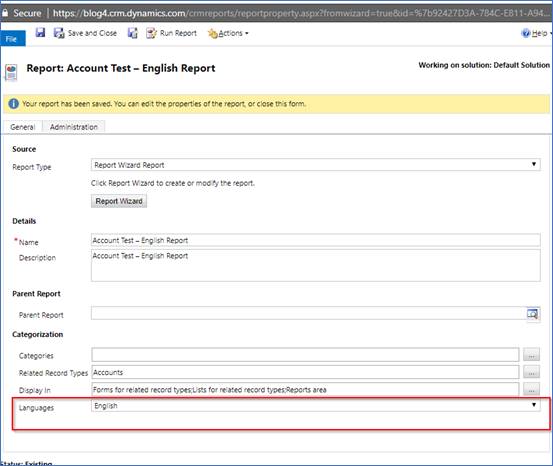
In this window you can see the highlighted option “Languages”.
In the languages you will find options of the languages which are enabled in your system.
So, in my case I have “All Languages”, “English”,” French”. We have selected English for this report.
Now in CRM we will check for a user with English as Default language. We will see the reports available as shown below:

And when the user with Default Language French opens the record you won’t see the report available as shown below:
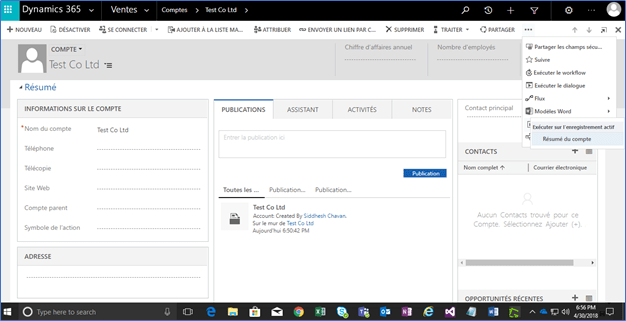
So using the Languages option while creating/editing report we can display the reports based on users default language as explained in this blog.
Hope this helps.
SidnCRM

 D365 CRM Topics by Sid
Seems interesting and helpful.. Keep posting…
LikeLike