
Microsoft keeps on adding features in their every releases. Similarly now they have added an important feature which most of the clients might have asked for. And in-order to achieve it you might have done some custom development thereby increasing the effort required. So it is to option to decide what to create and what to not while Qualifying a Lead.
Exactly now we don’t need to write a plugin to achieve this, simply set the settings and its done. I will explain it in detail below:
Navigate to Settings >> System Settings
Open the Sales Tab. You will find the below highlighted option:

Qualify Lead experience:
So as you can see there is an default option for create account contact and opportunity on Qualify Lead. By default it is set to YES. In my case I have changed it to No and now I have created a new Lead and trying to Qualify it.
On Qualify I get the below options:
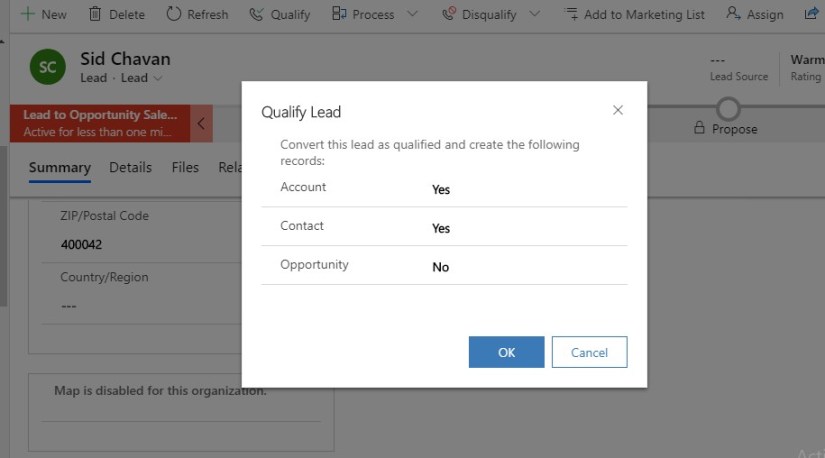
So now I can decide what I want to create on Qualifying a Lead. I select all the options as Yes and click OK.
Then as i result all the 3 records got created. Now moving ahead suppose there are duplicate account or contact details and we try to Qualify the lead the we get the Duplicate warning as below:

If we click continue then the new duplicate Account/Contact records will get created in System. Else if we select the suggested Account/Contact then it will be set and used while creating Opportunity.
Note- The feature is available on both legacy Web Client and the Unified Interface.
This feature is a real time savior and easy to configure.
Keep configuring and do less coding !

 D365 CRM Topics by Sid