
Recently one of my colleague asked me about can we hide the sensitive input/output data which we can see in the Power Automate Run History ? This made me search and get the quick response of the available option to achieve it. (which I was really surprised I was not using)
So below is a sample Power Automate which i created to showcase this. I created a Instant flow “Run Test Flow” with Input Parameter ”Get Value” and then we will use this value to create a record in table “Custom Test A”
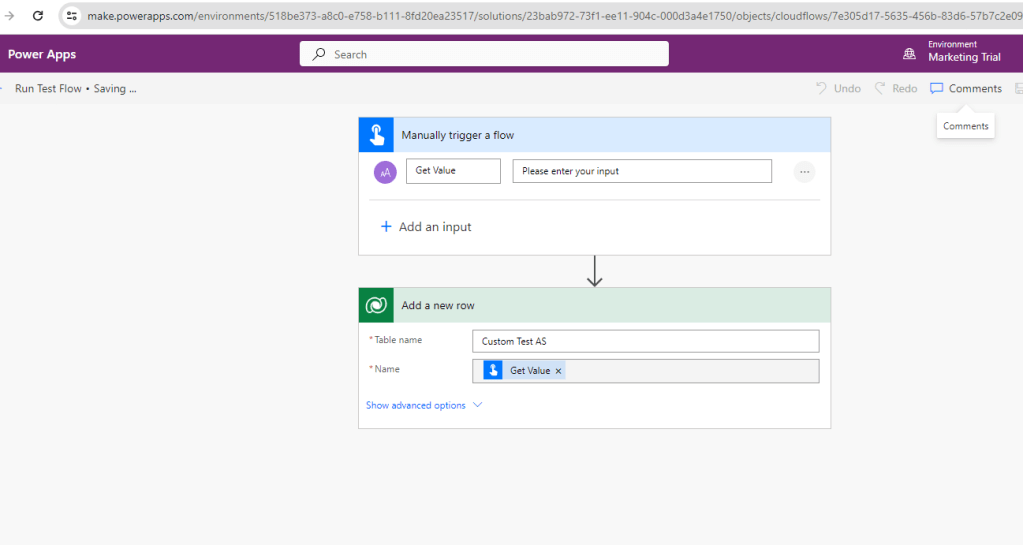
Usually the flow run history of one of the sample run of above flow will look as below-

As you can see you will be able to see the value entered in the field “Get Value” as “Value entered by sid”.
Now we will enable the Secure Input/Output Settings for both the steps added in the above flow considering it to be sensitive information by selecting the steps and click on Settings from ellipsis as below.

After enabling it, we will again run the flow and then open the latest run of the flow. We will see the below screen –

So now you can see that the entered value and the contents in the steps were hidden.
So using above setting we can hide the sensitive data which we don’t want to show in the Flow Run history.
Note- The data is hidden only for the flow runs after the setting is enabled and not for the past runs where the setting was disabled.
Hope this helps !!
 D365 CRM Topics by Sid