
Whenever we create a new Real-time journey in Dataverse, we see the Default time zone set to “GMT Coordinate Universal Time” as below. This is the default behavior of journeys. And then when we need to run the journey in specific time zone we change the value of the time zone dropdown to specific time zone and then publish the journey.

Have seen couple of times if we don’t change the journey time as per the selected time zone and publish the journey then we will have to wait for the corresponding GMT time to start the journey.
So in-order to address this thing we have option to select the Default settings for the time zone by following below steps.
Navigate to Settings > Journey Settings as below.

You will get the below page opened, on click of Journey settings where we will get the dropdown for time zone type as below-

So as you can see above we have 2 options here
Option 1 – As specific timezone
When we select this we get the option to select a default time zone which we want to be applicable for all the journey records created after enabling this setting.
So after selecting this option we need to select the Default timezone which we want to apply for new journeys as below-
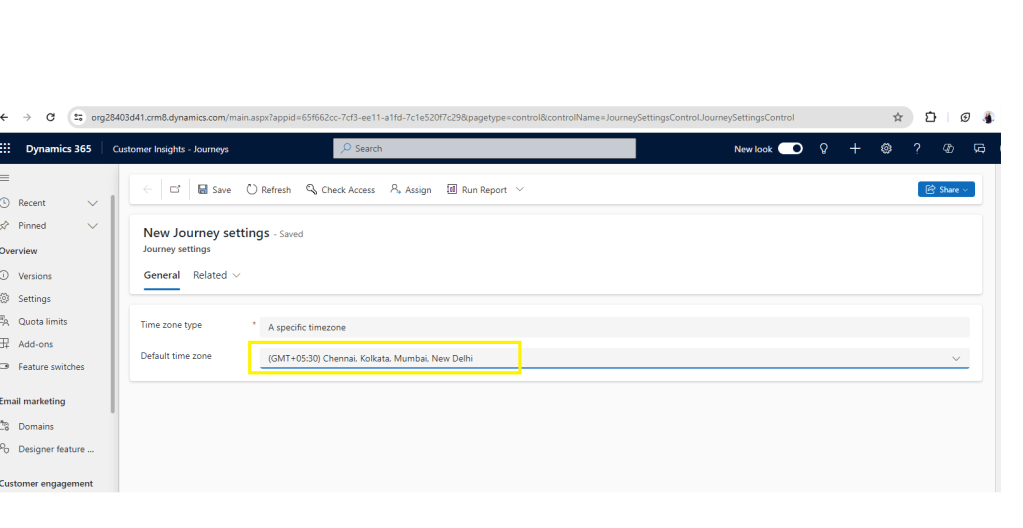
After enabling this setting the new journey records will populate the same time zone value as selected above.
Option 2- The time zone of the user who creates the journey
When we select this option the default time zone on the journey is set as per the time zone of the user creating the journey. So if you want to apply user’s time zone to the journeys created by them, we can have this setting enabled as below.

When we enable any of the above options as per the business need, we will start seeing the changes in the default time zone set on the new journey records as below-

Note– This setting will work for the new journey records created after enabling the settings.
Hope this setting is useful for people like me who don’t want to manually change the time zone every time they select a new journey record.

 D365 CRM Topics by Sid
Hello Siddhesh.
Interesting post, thanks. This is something we have been looking to have available. But I do not have this option available in Settings. Our system is updated to the last release, but I do not see this option on Settings. Is there any switch that must be enabled first?
LikeLike
Hey there, Sorry I missed this notification. Can you share what option is available to you ?
LikeLike
Hello Siddhesh,
I found that this is something that you can add to the Settings page. I customized and added to the settings page and now it’s available. But besides selecting “The time zone of the user who creates the journey” it keeps using the default setting from GMT. But when you try to use “copilot” to generate the Journey, the it set the time zone according to the user time zone. Really strange behavior, probably i will create a MS support ticket
LikeLike