Uncategorized

Tip – Show/Hide Buttons on Entity List and Sub-Grids in Dynamics Portal without coding

Recently we had a requirement where we had to hide  the Delete buttons on Entity List for records having Status Reason as “Submitted” and show it only for “Draft” records.

First thought came to my mind was using Javascript on load event and hiding the button through script. Of course this works but after checking some configurations before going for coding i got to know about  the below OOB option to achieve this.

2019-02-22 19_1

Clicked on the Advanced settings in the Grid Configuration where you add any button (in my case I have added Delete button).

So there is a field named Filter Criteria for each button which we select to shown in the List.

So what we have to do is just create a Fetch XML using Advance Find and have the condition defined in it and then download the same and paste it in the Filter Criteria field in CRM. And there you go it works like a charm without adding any custom code !!

2019_02_22_19_12.png

Similarly can be done for Subgrid Configurations.

Hope this helps !


Uncategorized

Using CorrelationId to avoid Recursion in CRM Plugins

Recently we had a scenario where we had to avoid the recursion occurring in CRM Plugin due to update of a field through same plugin.

Checking Depth would have helped to avoid this but we had some scenarios where the Depth check won’t work.

So we used the below approach to handle this scenario:

There is a property of IExecutionContext named CorrelationId which stores the GUID for tracking plug-in or custom workflow activity execution.

For more details click here.

We had a class level variable which stored the value of context.CorrelationId.

And before we proceeded the further logic we checked if the value stored in variable is same as context.CorrelationId then only proceed further else return.

Hope this helps!!


Uncategorized

Tip – Email Templates for Multi-Language Enabled Organization

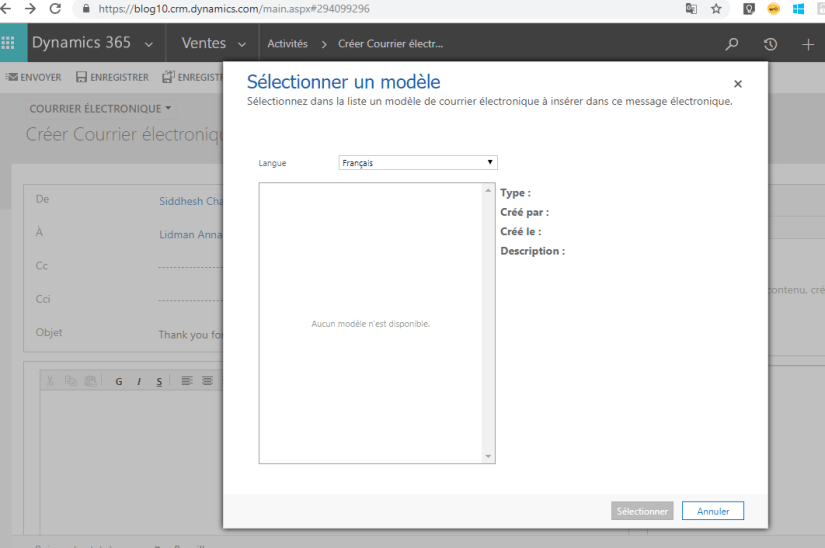
Recently, we encountered a scenario where our client reported that the French user is unable to Insert the Email Template which the English user could see by Default on lead while create an email

i.e.  as below no options were seen:

2018-12-12 1

So when the user changed the language to English he was able to select the Template and Insert it into the Email.

However later on the client reported the bug that Status Reason field on lead is getting populated in English and not with the French.

So this brought to us the issue that the Email Templates are language specific. i.e. it depends on the language we select while creating the Email Template.

So in our case, we had selected English language in the Email Template so it was showing English value of the Option set when selecting that:

2018-12-12 2.png

So for the French users to make the template visible by Default we had to create a same Email Template in French language and then the value of Status Reason in the Email was populated with the French translation in the system.

So if you are working with Multi language enable organization then make sure you are using multiple language Email Templates too to avoid the translation issues.

Hope this helps.

Uncategorized

How does Total Time in Case Resolution is calculated?

You might have seen the popup dialog of Resolve Case when you click on Resolve Case as below:

2018-12-03 1.png

So, someone asked me from where the locked Total Time is calculated in the System.

I didn’t know the prompt answer for this. So, had to go through some basics and it was worth a finding to clear my concepts.

Total Time = Duration of all the Completed Activities related to Case.

Hence when I created a Task with Duration 30 minutes and marked it complete the Total Time populated that value i.e. 30 minutes.

2018-12-03 2.png

So to conclude if I had added another Activity and marked it completed then that Duration would have summed up and shown in the Total Time field when we attempt to resolve the case.

Hope this helps.

Uncategorized

Read Formatted values from Related Entities using Linq in Dynamics 365

Recently, I was trying to retrieve formatted values using Linq.I was able to do for the attribute of the same entity with the help of this blog: Read Formatted Values using Linq.